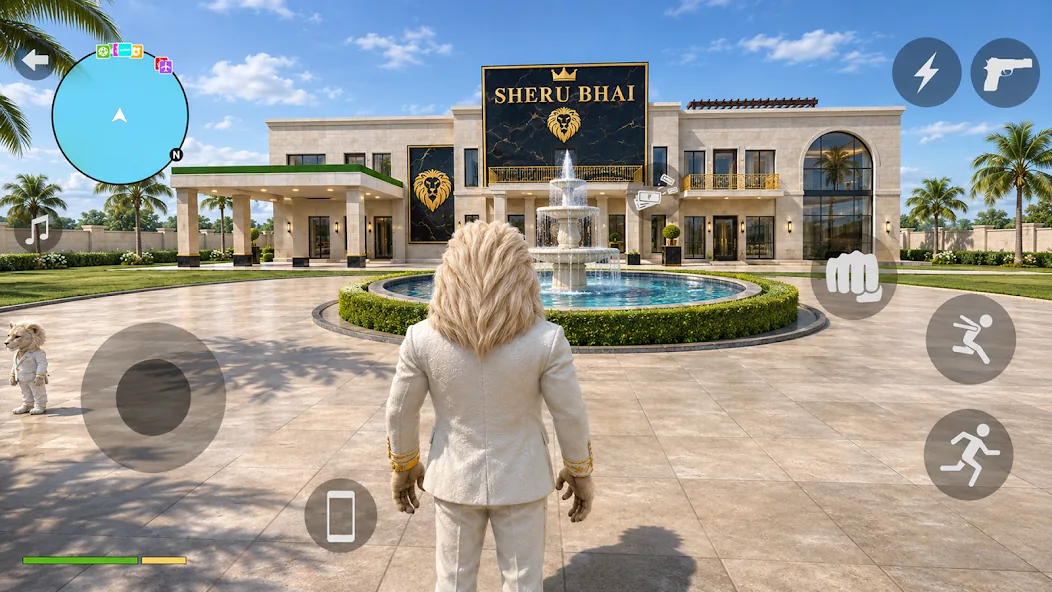
Sheru Bhai Game Download
Store links, package IDs and what to do when an install stalls.
Image source: Google Play listing for com.Skorax.SheruBhaiGame.
For a sheru bhai game download, the safe route is the Google Play listing that belongs to the app you actually want. Three listings are covered on this site, from two developers, and their display names overlap. This page gives you the store route for each one and a short checklist for installs that fail. It does not offer a file of any kind: no APK, no modified build, no mirror and no installer.
Use the official store
Every store button on this site opens play.google.com with a package ID in the address. That ID is the app's technical name, and it is the best way to avoid opening the wrong listing. Once the page loads, check the developer line before you install. If the developer name does not match what you expected, close the page and come back to the comparison table.
All three listings say "Contains ads" and show no upfront price. You do not need to pay to install any of them. If a page asks you to pay for the download, or asks you to turn off a device protection setting first, it is not a route we recommend.
Which listing to open
If you want the mansion, the wardrobe, the island and the in-game phone, open com.Skorax.SheruBhaiGame, listed as Sheru Bhai Life Simulator Game by Skorax. Its store page shows an update date of 23 Nov 2026 and offers Android plus Windows through Google Play Games on PC.
If you want the city-driving app with motorcycles, helicopters and armed vehicles, the two candidates are com.ot.sheru.bhai.wala.game and com.ot.sheru.bhai.aura.game, both from ONLYTECH SOLUTIONS. Their descriptions are close, so read the title on the store page: Sheru Bhai Wala Game or Sheru Bhai Aura : Royal City.
Installing on Android
Open the listing in the Play Store app, tap Install and wait for the download to finish. The Skorax description says there is no sign-up and no account, so you can open the game without creating a player login. It also says the game plays offline, which means you do not need a connection after installation.
We do not publish a minimum Android version or a file size, because the store listing does not print those numbers. Your Play Store page will show the requirements for your device, and that is the place to check them.
Installing on Windows
Two listings show an "Install on Windows" option through Google Play Games on PC: the Skorax game and Sheru Bhai Aura : Royal City. The listings publish minimum requirements for that route: Windows 10 (v2004), a solid-state drive with 10 GB of free space, Intel UHD Graphics 630 or comparable, four physical CPU cores, 8 GB RAM, a Windows admin account and hardware virtualisation enabled.
They also note that PC availability may vary. The Sheru Bhai Wala Game listing did not show a Windows option when we checked it, so do not assume all three can be installed on a computer.
If the download does not start
Check your connection first, then check free storage on the device. A stalled download is often just a full drive or a dropped Wi-Fi signal. Restart the Play Store app and try the listing again.
Next, update the Google Play Store app itself. If it still stalls, go to your device's app settings, find Google Play Store, open its storage settings and clear the cache, then restart the phone. These are general Play Store steps, not game-specific instructions.
If the app will not install
If the store says the app is incompatible, compare your device with the requirements shown on that listing. Availability can also depend on region, so the same listing may appear on one account and not on another. We cannot confirm availability for every country.
If you see "App not installed", check free space again and see whether an older copy of the same package is already present. If Play Protect shows a warning, do not work around it by installing a file from elsewhere; nothing on this site asks you to do that.
What we will not host
There is no downloadable game file on this domain. We do not keep an APK, a patched version, a currency tool or a copy of any installer. Game copyrights belong to the developers named on the store pages, and the only download buttons here lead to Google Play.
That also applies to the cheat-code question. The official descriptions do not publish a code system, and we do not provide third-party modification tools. If you want to know what is inside a game, read the store description rather than a file shared in a comment section.
Questions people ask
Can I download an APK from this site?
No. This site hosts no APK, mod, cracked build or modified installer. The only download route we recommend is the official Google Play listing for the package you identified.
Which package should I search for?
Use com.Skorax.SheruBhaiGame for the mansion and wardrobe game, com.ot.sheru.bhai.wala.game for Sheru Bhai Wala Game, and com.ot.sheru.bhai.aura.game for Sheru Bhai Aura : Royal City. Match the package before you tap install.
Why does the app not appear in my store?
Availability can depend on region and device. Open the listing in a browser to see whether Google Play shows it for your account, and check that the Play Store app is up to date. We cannot confirm availability for every country.
Is the download free?
All three listings show no upfront price and say "Contains ads". Free means you do not pay to install; it does not mean the game is ad-free.
To repeat the whole process: identify the package, open the official listing, install from the store, and use the checklist above if it stalls. That is the sheru bhai game download route we can stand behind.